
A lead-capture Flow should connect a clear customer interest to an owned follow-up. Collect the minimum useful details, keep promotional choices separate and verify that the completed response reaches the intended team.
Match the invitation to the next screen
Tell the customer what they will receive after completing the form. A request for product information should not silently enroll them in unrelated promotions. Avoid promising availability, a price or an approval that the receiving team cannot guarantee.
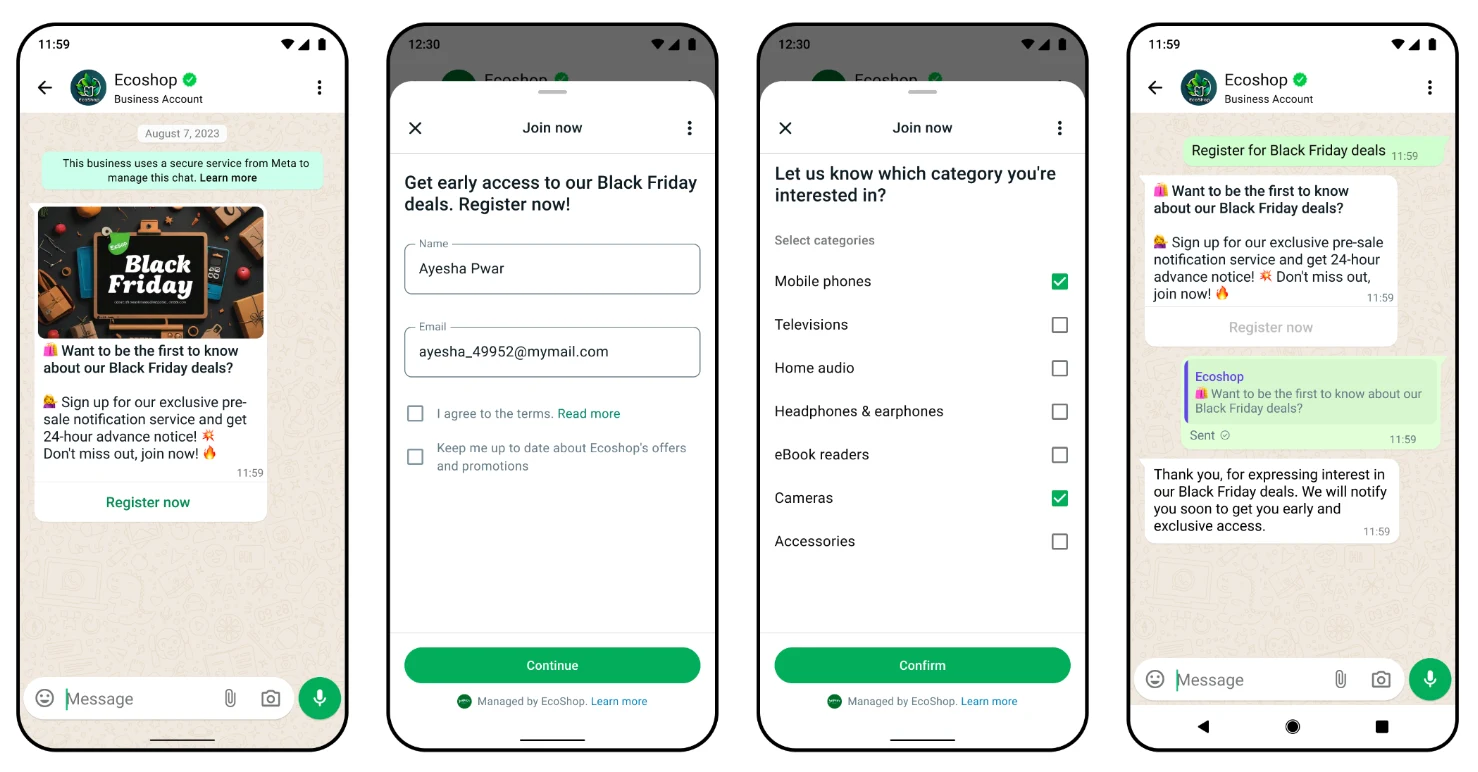
In the supplied example, the customer registers interest and chooses product categories. The acknowledgement confirms interest received, rather than claiming a purchase or payment.
Ask questions an agent will use
Choose qualification fields with the follow-up owner. For a software demo, the useful questions may be business need, approximate volume and a preferred time. Leave optional detail optional.
A shorter form is not automatically a better lead source. Compare completed enquiries with relevant conversations and outcomes, and check whether a confusing question is discouraging otherwise suitable customers.
- Define the requested next action.
- Avoid duplicate contact questions where the context is already known.
- Keep sensitive identity and financial data out of routine lead forms.
Verify the record and assign follow-up
Test how your current workspace stores a completed form response. If lead projection or another destination is optional, configure it explicitly and confirm a real test record rather than assuming every response creates a CRM lead.
Assign an owner and a meaningful status. A template send, a read event and a completed sale are different outcomes; keep them separate when reviewing performance.
- Complete a controlled test on a phone.
- Find the resulting response or lead record.
- Check ownership and the next follow-up step.
- Use eligible messaging and honor suppression.
Frequently asked questions
Is an interest form the same as an order?
No. Interest, an enquiry, a confirmed order and payment are separate states. The form and follow-up should say which one actually occurred.
Should every form completion become a CRM lead?
Only if that destination is appropriate and configured. Feedback and support forms may need different handling. Verify the response destination in your workspace.
Sources and scope
Prepared with AI assistance using the product implementation, linked references and supplied illustrations. Interface details and platform requirements can change. Examples are not customer case studies or proof of availability in every workspace. Confirm the current interface and account permissions before making production changes.